
What your debt actually costs, and how to get out sooner.
Amortization, prepayment, snowball versus avalanche, refinance break-even. Debt Strategist runs the numbers on your iPhone, with no account and no connection.

$4.99 · one-time purchase, no subscription · iOS 18 or later
Features
Five calculations, one place
Online calculators answer one question at a time. Here you enter each credit once and every simulation runs on it.
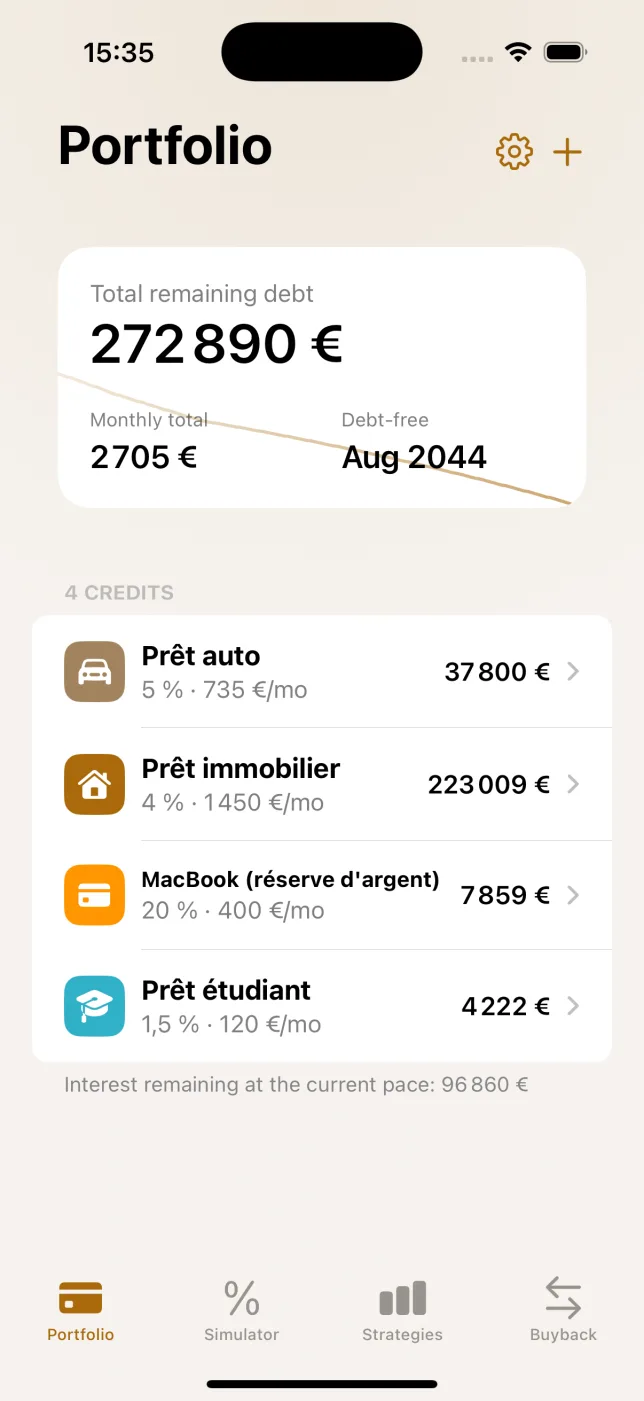
Portfolio
Total debt, combined monthly payment, debt-free date and the interest left at your current pace. One line per credit, with its rate and payment.
Amortization
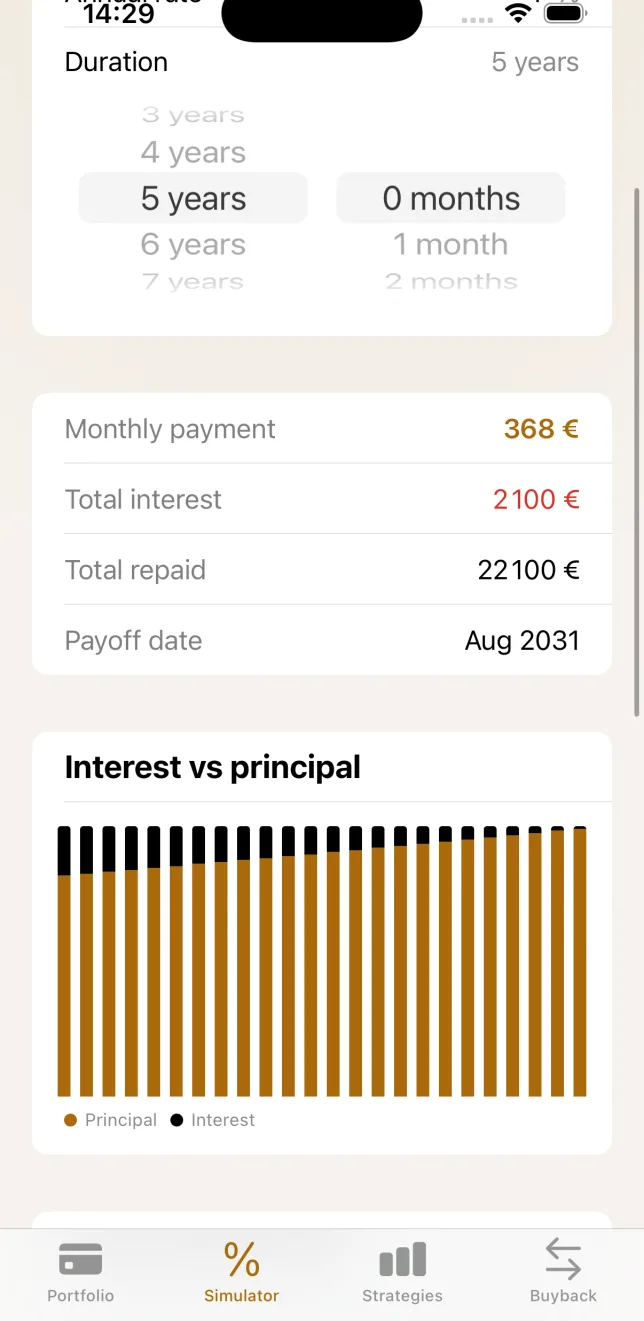
Installment by installment: interest, principal, remaining balance, cumulative interest. With the interest versus principal chart.
Prepayment
A lump sum at a given month, or a higher monthly payment. The result: interest saved and months gained.
Strategies
Snowball against avalanche across every debt, with an extra monthly budget and freed-up payments rolling over.
Buyback analyzer
Balance, origination fees, penalty, new rate, new term. Total cost against the status quo, net gain and the break-even month.
PDF export
The full schedule and the buyback summary as a PDF, ready to file or send to your bank.
Payment or term: one derives the other
Enter the balance and the rate, then pick whichever you know. The app works out the rest, shows the total cost and the interest-to-principal split over time. A simulation worth keeping joins your portfolio in one tap.
Snowball or avalanche
Two methods, two different promises
You pay the minimum on every credit and put an extra budget on one of them. The question is which one.
Snowball
Smallest balance first
One credit clears quickly and its payment rolls into the next. What it buys: momentum, and a first debt gone sooner.
Avalanche
Highest rate first
The money goes where it costs most. What it buys: the lowest possible interest total, and often a few months less.
The app runs both plans on your credits, then says what each one wins.
Total interest, debt-free date, payoff order, and the gap between the two methods. Neither is crowned by default: avalanche is always the cheaper one, snowball sometimes clears your first credit months earlier. You pick the one you will stick to.
Privacy
Your credits never leave your phone
This is mathematics, not a service. The app needs no server to do it, so it uses none.
No account
Nothing to create, nothing to connect. Open the app and enter a credit.
No network calls
Every calculation runs on the device. The app works in airplane mode.
No data collected
No analytics, no tracker, no ads. Your data stays in local storage.
Pricing
One payment, for good
$4.99
A single in-app purchase. No subscription, no renewal, restore included.
The portfolio, the amortization table and the prepayment simulator are free to use, with no time limit.
Free
Full version
FAQ
Frequently asked
Do I need an account?
No. The app opens on an empty portfolio and you enter your first credit straight away.
Are my amounts sent anywhere?
No. Credits are stored on the device and the maths happens there. The app talks to no server.
Is this a subscription?
No. The full version is a one-time $4.99 purchase, restorable on your devices with the same Apple Account.
Which currency does it use?
Your region's by default, changeable in settings. No symbol is hard-coded.
Is this financial advice?
No. The app computes scenarios from the figures you enter. Fees and penalties are your own inputs, never legal rules coded into the app.
Which devices are supported?
iPhone and iPad on iOS 18 or later. The app ships in English and French.
A question, a bug, an idea?
Write to me, I read everything. Include your iOS version and the screen involved if something went wrong.